Running Operations
To run all of your outstanding operations, execute the operations artisan command:
The order in which operations are called is checked by file name in alphabetical order, without taking into account directory names:
Isolating Execution
If you are deploying your application across multiple servers and running operations as part of your deployment process, you likely do not want two servers attempting to run the database at the same time. To avoid this, you may use the isolated option when invoking the operations command.
Split Execution
Sometimes it becomes necessary to launch operations separately, for example, to notify about the successful deployment of a project.
There is a before option for this when calling operations:
When you call the operations command with the before parameter, the script will only perform operations for which the needBefore method is true.
For backwards compatibility, the needBefore method returns true by default, but operations will only be executed if the option is explicitly passed.
For example, you need to call operations when deploying an application. Some operations should be run after the operations are deployed, and others after the application is fully launched.
To run, you need to pass the before parameter. For example, when using Deployer it would look like this:
Thus, when operations is called, all operations whose before parameter is true will be executed, and after that, the remaining tasks will be executed.
Forcing Operations
Some operations are destructive, which means they may cause you to lose data. In order to protect you from running these commands against your production database, you will be prompted for confirmation before the commands are executed. To force the commands to run without a prompt, use the --force flag:
Every Time
In some cases, you need to call the code every time you deploy the application. For example, to call reindexing.
To do this, override the shouldOnce method in the operation file:
If the value is shouldOnce is false, the up method will be called every time the operations command called.
In this case, information about it will not be written to the operations table and, therefore, the down method will not be called when the rollback command is called.
Specific Environment
In some cases, it becomes necessary to execute an operation in a specific environment. For example production.
For this you can override the shouldRun method:
You can also specify multiple environment names:
You can work with exceptions in the same way:
Database Transactions
In some cases, it becomes necessary to undo previously performed operations in the database. For example, when code execution throws an error. To do this, the code must be wrapped in a transaction.
By setting the withinTransactions to true parameter, you will ensure that your code is wrapped in a transaction without having to manually call the DB::transaction() method. This will reduce the time it takes to create the operation.
Asynchronous Call
In some cases, it becomes necessary to execute operations in an asynchronous manner without delaying the deployment process.
To do this, you need to override the shouldBeAsync method in the operation class:
In this case, the operation file that defines this parameter will run asynchronously using the DragonCode\LaravelDeployOperations\Jobs\OperationJob job.
The name of the connection and queue can be changed through the settings.
Interaction with migrations
Operations can also be invoked when Laravel migrations are completed (php artisan migrate). The Laravel event system is used for this purpose.
To do this, add a withOperation public method to your migration file that will return the name of the file or folder to call. For example:
Now, once the migration is done, Laravel will send a MigrationEnded event, catching which the php artisan operations console command will be called passing this parameter.
The same thing will happen if you invoke the following console command:
This method works with all three migration methods: up, down and __invoke.
When the php artisan migrate console command is called, the operation will call the up or __invoke method.
When the php artisan migrate:rollback console command is called, the operation will call the down method if it exists in the operation file.
Laravel Idea support
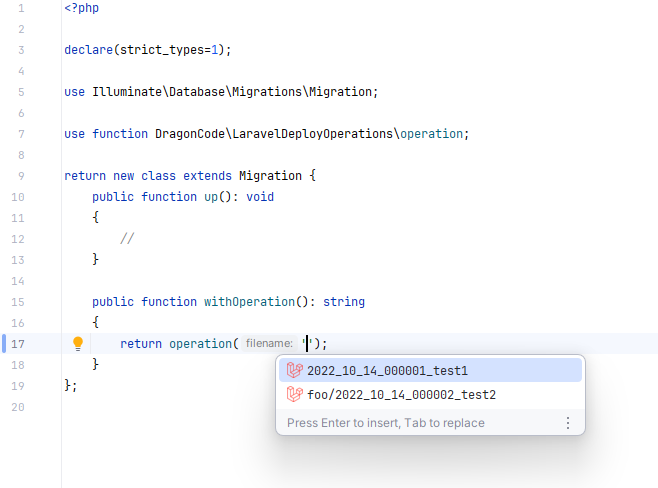
If you are using JetBrains PhpStorm with the Laravel Idea plugin installed, then autocomplete will be available to you:
To avoid entering file names manually, you can use the operation helper function. All it does is to suggest IDE paths to operation files with recursive search.